
Free SEO Checker & Analyzer: How to Analyze Your Website SEO
Want to understand how well your website is optimized for search engines? Learn how to check page titles, meta descriptions, headings, links, structured data, social previews and technical SEO with a free online SEO checker.
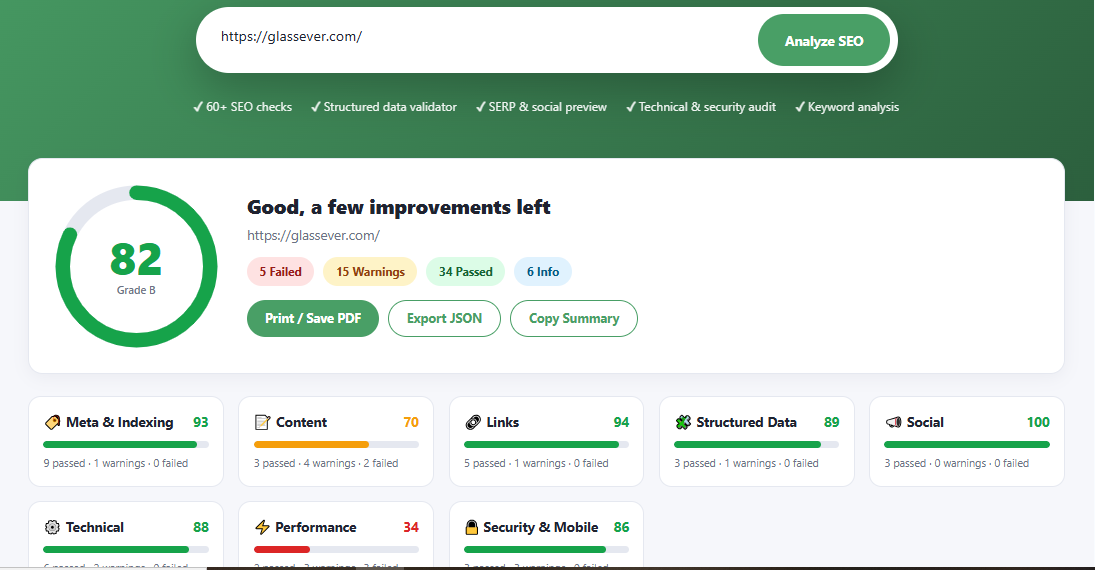
Find issues and discover opportunities to improve your pages.
Search engine optimization involves more than adding keywords to a page. Search engines need to discover your content, understand its purpose and access important page resources. Visitors also expect useful content, clear navigation and a website that works well on their devices.
A website SEO checker helps you review important optimization elements in one place. Instead of manually inspecting every tag and page element, you can use an analyzer to identify potential problems and decide what needs attention first.
What Is an SEO Checker?
An SEO checker is an online tool that examines a webpage for common search engine optimization issues. Depending on the tool, it may review HTML metadata, heading structure, links, image attributes, structured data, social sharing tags, security signals and performance-related information.
The purpose of an SEO audit is to help website owners understand how a page is configured and identify areas that may need improvement. It can be useful for bloggers, developers, digital marketers, business owners and SEO professionals.
Try the Glassever Free SEO Checker to analyze a webpage and review the available checks and recommendations.
Why Is Website SEO Analysis Important?
Even a well-written page can have technical or on-page issues. A missing title, unclear heading structure, broken internal links or incorrect canonical URL can make a page harder to maintain and optimize.
Regular SEO checks can help you:
- Identify metadata problems: Review page titles, meta descriptions and indexing directives.
- Improve page structure: Check headings and make content easier to understand and navigate.
- Review links: Find potential link issues and improve connections between relevant pages.
- Validate structured data: Look for markup issues that could affect eligibility for supported search enhancements.
- Check social sharing information: Review how page titles, descriptions and images are configured for sharing.
- Prioritize improvements: Use audit findings to decide which issues deserve attention first.
An SEO score is a diagnostic indicator, not a search ranking guarantee. Rankings depend on many factors, including content relevance, competition, crawling, indexing and overall page quality.
How Does an Online SEO Analyzer Work?
An SEO analyzer typically accepts a webpage URL, retrieves or examines accessible page information, and evaluates selected elements against a collection of checks. The exact checks and results depend on the tool.
Enter the webpage URL
Open the SEO checker and enter the complete URL of the page
you want to review, including its protocol, such as
https://example.com/.
Run the analysis
Start the audit and allow the tool to examine the information it can access. Some checks may depend on the website's configuration or the resources available to the analyzer.
Review the findings
Examine the results for metadata, headings, links, structured data, social tags and other available technical checks.
Fix and verify issues
Prioritize important problems, update your website and run another audit to check whether the changes addressed the original findings.
Ready to check your website?
Run an SEO analysis and explore opportunities to improve your page.
What Should an SEO Audit Check?
A useful website audit looks at multiple areas rather than focusing on a single metric. Here are some of the most important elements to review.
1. Page Titles and Meta Descriptions
The HTML title helps describe a page's subject and can appear as the title link in search results. A meta description provides a summary that search engines may use when generating a search snippet.
Review the following:
- Does the page have a meaningful title?
- Does the title accurately describe the page content?
- Is the meta description useful and relevant?
- Are titles and descriptions unnecessarily duplicated across pages?
Write naturally for people first. There is no universal character limit that guarantees a title or description will display in full in search results.
2. Heading Structure
Headings organize information into meaningful sections. A clear hierarchy makes a page easier to scan and helps readers understand how topics relate to one another.
Use descriptive headings that reflect the content of each section. Avoid adding keywords where they do not fit naturally, and do not use heading tags only to change the visual size of text.
3. URL and Canonical Tags
A canonical link can indicate the preferred URL for substantially similar pages. This is especially useful when a website generates multiple URLs for the same or similar content.
Check that canonical URLs point to the intended page, use the correct domain and protocol, and do not accidentally point unrelated pages to a single URL.
4. Links and Navigation
Internal links help visitors discover related information and allow search engines to find other pages on your website. External links can also provide useful context for readers.
During an audit, review:
- Broken or inaccessible links.
- Links to important pages from relevant content.
- Descriptive anchor text.
- Unnecessary redirects and navigation problems.
5. Images and Alternative Text
Images can make content easier to understand, but they should also be implemented thoughtfully. Relevant alternative text helps describe meaningful images to people who use assistive technologies and can provide context when images cannot be displayed.
Use descriptive filenames where practical, compress large image files and provide appropriate dimensions. Decorative images generally should not contain unnecessary alternative text.
6. Structured Data
Structured data provides information about a page using a standardized format. Depending on the content, websites may use supported schema types for articles, products, organizations, breadcrumbs and other entities.
Make sure the markup matches the visible page content and follows the relevant search engine guidelines. Adding structured data does not guarantee a rich result or a higher ranking.
7. Social Media Metadata
Open Graph and other social metadata can help platforms understand which title, description and image to use when a URL is shared.
Review the social title, description and preview image for accuracy. A page can have good search metadata but still have an incomplete or unappealing social sharing preview.
8. HTTPS and Technical Signals
HTTPS protects data exchanged between the browser and the website. A technical SEO review may also help identify configuration issues, inaccessible resources and other problems that deserve investigation.
An automated checker cannot necessarily test every server configuration or security concern. Use specialist tools and server logs when a deeper technical investigation is required.
9. Mobile Usability and Performance
Pages should be usable on phones, tablets and desktop screens. Layout problems, oversized images, heavy scripts and slow server responses can make a website frustrating to use.
Use a combination of responsive testing, browser tools and performance measurement tools to investigate issues. A basic SEO audit may not reproduce real-user performance measurements or test every device.
How to Prioritize SEO Issues
An audit may produce many findings, but not every warning has the same importance. Prioritize issues according to their potential effect on accessibility, crawling, indexing, usability and content relevance.
Access and indexing problems
Investigate unexpected blocking directives, incorrect canonical URLs, server errors and important pages that cannot be accessed.
Important on-page issues
Improve missing or misleading titles, weak page descriptions, confusing headings and poor internal linking where relevant.
Enhancements and minor warnings
Review optional metadata, non-critical warnings and improvements that support a better experience without distracting from more serious problems.
These categories are a practical workflow, not a universal ranking formula. Always investigate the actual page and its purpose before deciding what to fix.
Common SEO Mistakes to Avoid
Duplicate titles
Reusing identical titles on unrelated pages can make their individual topics less clear.
Keyword stuffing
Repeating keywords unnaturally can make content difficult to read and less useful.
Broken internal links
Outdated links can frustrate visitors and make important resources harder to discover.
Incorrect markup
Invalid or misleading structured data can prevent eligibility for supported search enhancements.
Who Can Benefit from an SEO Checker?
Website analysis can help people with different levels of SEO experience. You do not need to manage a large website to benefit from reviewing important page elements.
- Bloggers: Review article titles, descriptions, headings and internal links.
- Business owners: Check important service pages and landing pages.
- Web developers: Inspect technical page elements during development and maintenance.
- Digital marketers: Review optimization opportunities before and after content updates.
- SEO professionals: Use automated checks as an initial step in a broader audit process.
Best Practices for Better SEO
A successful SEO process combines technical checks with useful content and a good user experience. Use these practices as part of your regular website maintenance routine.
- Create helpful, original content. Answer the questions your intended audience is trying to solve.
- Write descriptive titles. Make each important page's purpose clear without unnecessary repetition.
- Keep your website accessible. Check crawling directives, HTTP responses and internal navigation.
- Use relevant internal links. Connect related pages where the links genuinely help visitors.
- Optimize the mobile experience. Test layouts, readable text, navigation and interactive elements.
- Measure performance. Use appropriate tools to investigate loading problems and user experience.
- Monitor search performance. Use Google Search Console to investigate indexing and search visibility.
- Recheck after major changes. Run another audit after redesigns, migrations or significant content updates.
What an SEO Checker Cannot Guarantee
Automated analysis is useful, but it has limitations. A checker may not be able to access pages behind authentication, execute every JavaScript-dependent element, inspect server-side settings or measure actual user experience across all devices.
It also cannot guarantee that search engines will crawl, index or rank a page in a particular position. Search visibility depends on many signals beyond the results of a single audit.
For a more complete assessment, combine an SEO checker with Google Search Console, performance testing, manual content review and server-side diagnostics where appropriate.
Frequently Asked Questions
Analyze Your Website SEO with Glassever
Get a clearer picture of your webpage's optimization by reviewing metadata, headings, links, structured data and other available SEO checks. Use the findings to plan meaningful improvements.
Try the Free SEO Checker